Documentation
Heat Pump Cost Optimizer for Home Assistant
Model-predictive heating control for Home Assistant. It plans your heat pump and your hot water 24 hours ahead against hourly electricity prices, the weather forecast, and a thermal model of your own house that it keeps correcting from your own sensors — so the house stays as warm as you asked, bought in better hours.
HACS: custom Home Assistant: 2025.2.0+ Python: 3.13+ License: MIT

Product page: the project at a glance, every sentence of it quoted from this README and the docs.
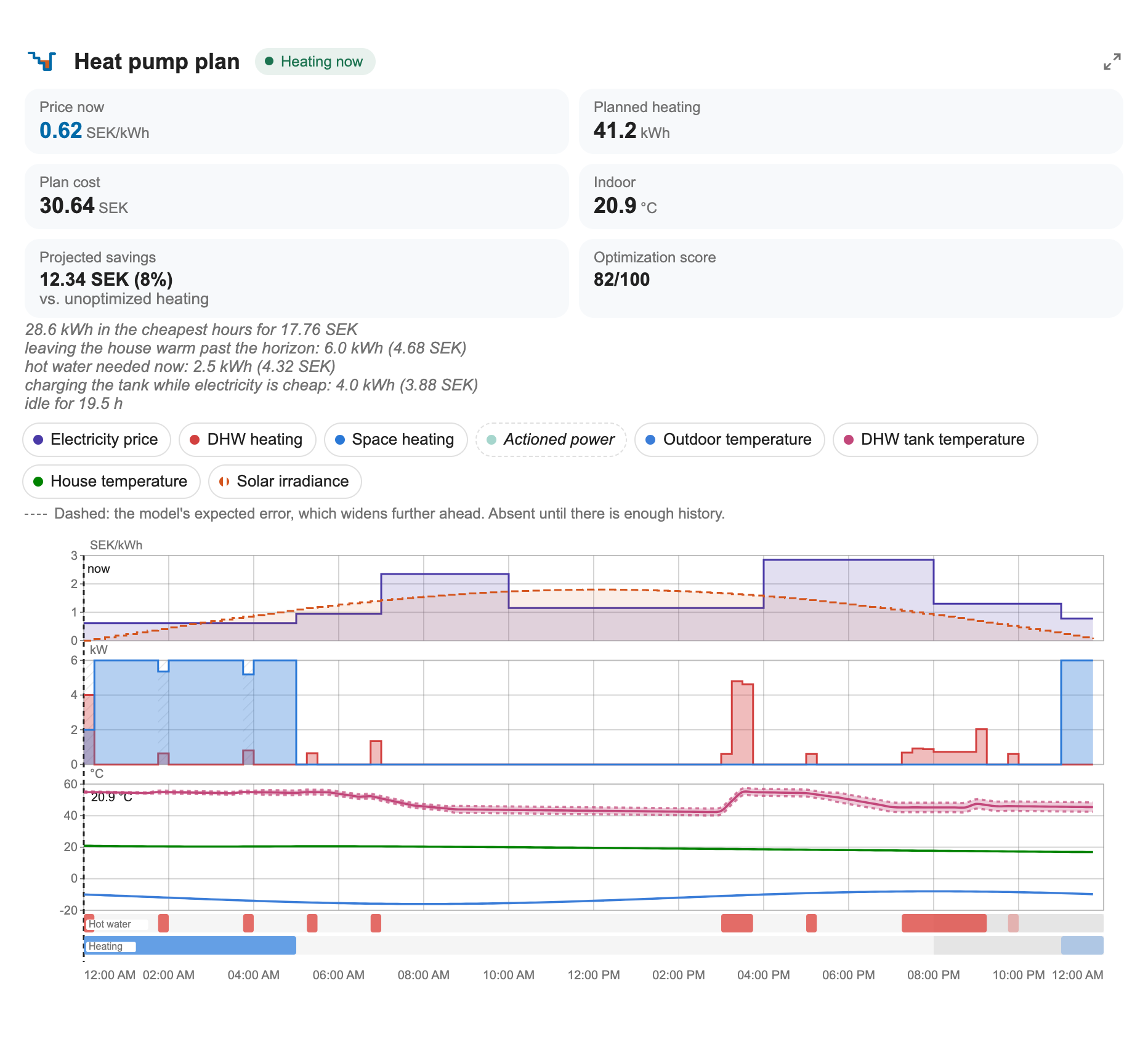
The next 24 hours as the optimizer sees them — price, forecast, solar, and the slots it picked for heating and for hot water. Screenshot of the shipped card against a solved plan; docs/dashboard-card.md reads every mark on it.
Acknowledgement
This project began as a fork of strutsfarm/heatpump_optimizer at version 2.2.0. The MPC formulation, the two-zone thermal model with its slab and buffer tank, the Tibber and weather integration, the config flow and the ECL110 heat-curve path are all originally strutsfarm's work; the companion strutsfarm/ecl110 project provides the MQTT interface this integration drives. Versions 2.3.0 onward were developed in this fork. Both projects are MIT licensed. The formal attribution is recorded in NOTICE, and LICENSE is kept as the verbatim MIT text.
At a glance
| Plans ahead | Learns your house | Knows what power costs |
|---|---|---|
| A 24-hour model-predictive plan, re-solved every interval | Heat loss, tank cooling, COP and more, estimated from your own sensors | Spot prices, grid fees and the capacity tariff |
| Handles real plumbing | Shows its work | You stay in charge |
| Buffer tank, mixing valve and wood tank modelled | Every planned slot carries a reason code on the card | Pin exact run slots from the card editor |
What it does
Plans ahead instead of reacting. A 24-hour model-predictive plan is re-solved on every interval against the full forecast trajectory, not against the weather right now. Space heating and hot water share one compressor, so they are planned against each other rather than one after the other, and every planned slot carries a reason code you can read off the card.
Learns your house. The heat-loss scale, tank cooling rates, the COP curve and its defrost derate, the solar aperture, internal gains, how the loss splits between floors, your hot-water draw statistics, your revealed comfort preference, and a cool-only heat-curve correction are all estimated from your own house. Every learner is snapshotted weekly (the last eight are kept), and a drift watchdog can roll them back to the last healthy snapshot.
Knows what your electricity actually costs. Tibber spot prices, time-of-use grid transfer fees, the monthly capacity (effekt) tariff and its billing clock, PV self-consumption priced at what consuming actually costs you, and a learned diurnal price prior for the part of the horizon that has not been published yet. A live peak guard and a main-fuse headroom advisor act inside the metering window the plan never saw, and a contract comparison settles the month three ways so you can see what your tariff choice is worth.
Handles real plumbing. A mixing valve is what lets a buffer tank store anything, so it is modelled explicitly. A wood furnace tank is a store of its own, drawn wood-first while it is usable, with an optional hot-water inlet coil. Your hydronic layout is picked from a catalog of drawn arrangements rather than described in prose, and circulation pumps — the hot-water loop and the space pump — are scheduled instead of left running.
Hot water that fits your household. Hot water is guaranteed inside demand
time frames rather than kept permanently hot, which is where most of the saving
comes from. The frames can differ by weekday — early on workdays, later on
weekends — typed as weekdays 06:00-08:30, weekend 08:00-09:30 or set one
day at a time on the options page, and the card's chart follows the resolved
per-day schedule across midnight. Draw statistics are learned per window, with
a heavy-day (90th
percentile) target so the second shower is not the one that runs cold. A setpoint
advisor proposes the cheapest setpoint that still covers those days; a mixed-water
sensor translates the tank into litres and shower minutes; anti-legionella can be
elastic, and takes the free disinfection when a burn or a cheap hour delivers it
anyway.
Shows its work. The plan is published as sentences grouped by reason, and graded 0–100 across envelope, machine and operation. Energy and cost accumulate into the Energy dashboard split by hot water versus space heating. Prediction accuracy carries a signed bias, and a one-shot diagnosis attributes the last interval's temperature error input by input. An advisor ranks the temperature sensors you have not added by how much they would tighten the model — an estimate, labelled as one — and a click assigns the sensor. Compressor starts are counted from the meter, and the wear they imply is priced rather than assumed.
You stay in charge. The card's editor pins exact run slots for up to 20 hours and the optimizer plans around them; a what-if simulator prices a comfort change before you commit to it; a climate entity and a switch give you the ordinary Home Assistant controls. Compressor frequency control is deliberately two-stage: it observes and advises until you explicitly turn writing on.
Stays out of trouble. A staleness watchdog treats a sensor that stopped updating as missing and pauses learning rather than training on a flatline. Open windows are detected and freeze the learners. Away and holiday mode sets back deeply and buys the recovery heat in the cheapest hours before you get home. An optional mould guard watches surface humidity. Safety — tank minimums, the legionella clock, the comfort floor — releases pinned slots it cannot honour and tells you which.
Fits your Home Assistant. Entity names are translated (English, Swedish and German) and follow your Home Assistant language, without touching entity ids or history. Monetary units follow your instance currency.

How the pieces fit — inputs, coordinator, self-learning, outputs (diagram source)
flowchart LR
    subgraph inputs["Inputs"]
        tibber["Tibber API<br/>hourly prices"]
        weather["HA weather entity<br/>temperature, wind,<br/>rain, irradiance"]
        meteo["Open-Meteo<br/>optional irradiance"]
        ha["Your HA sensors<br/>temps, power, presence"]
    end

    subgraph brain["Coordinator (every interval)"]
        pm["Price model<br/>learned prior + tariffs<br/>+ grid fees"]
        tm["Thermal model<br/>house, slab, tanks,<br/>two zones, DHW"]
        opt["Optimizer<br/>24 h MPC plan"]
        guard["Safety layer<br/>peak guard, fuse,<br/>manual-plan pins"]
    end

    subgraph learn["Self-learning (background)"]
        acc["Prediction accuracy<br/>+ drift watchdog"]
        learners["Loss scale, COP,<br/>solar aperture, DHW draws,<br/>comfort weight, heat curve"]
        snap["Weekly snapshots<br/>(last 8 kept)"]
    end

    subgraph out["Outputs"]
        ent["Entities<br/>sensors, binary sensors,<br/>buttons, switches,<br/>climate, datetime"]
        card["Dashboard card<br/>plan chart + editor"]
        ctl["Heat pump switch /<br/>ECL110 displace /<br/>frequency advisor"]
    end

    tibber --> pm
    weather --> tm
    meteo -. "irradiance override" .-> tm
    ha --> tm
    pm --> opt
    tm --> opt
    opt --> guard
    guard --> ent
    guard --> ctl
    ent --> card
    card -- "services:<br/>apply_manual_plan,<br/>simulate_plan, assign_entity" --> brain
    acc --> learners
    learners --> tm
    learners --> snap
    snap -- "restore on drift" --> learners
    ha --> acc
Requirements
- Home Assistant 2025.2.0 or newer (the first release whose own
requires-pythonis>=3.13.0) - Python 3.13 or newer. The suite is tested on 3.14.
- Electricity prices: a Tibber account with an API token
(developer.tibber.com), or a price entity — a
Home Assistant price sensor such as Nord Pool exposing
raw_today/raw_tomorrow - A weather integration with hourly forecasts (Met.no or similar)
numpy,scipyandthreadpoolctl, installed automatically from the integration manifest
Everything else — indoor and outdoor thermometers, tank probes, a power meter — is optional. The optimizer runs without them and gets steadily better with each one you add.
Minimal working setup
The two smallest setups that work, and what each piece is for. Every entity below is picked in the setup flow — see Quick start.
Plan only — nothing is switched. Two things, and setup will not finish without either:
- A price source: a Tibber token, or a price entity exposing
raw_today/raw_tomorrow(Nord Pool or similar). Prices are what the plan is optimized against. Setup asks again until you give one, and checks a Tibber token with Tibber before it continues. If prices later stop arriving, the optimizer skips planning until they are back rather than plan on invented prices. - A weather entity with hourly forecasts. The forecast outdoor temperature, wind and rain set how much heat the plan has to deliver hour by hour. If a forecast fetch fails, plans continue on the last forecast, marked stale.
With only these two, the plan is published on sensors for your own automations to act on, and the optimizer switches nothing.
The smallest setup that controls the pump. Add a switch that turns the
heat pump on and off — the Heat pump on/off switch field on the
Optional sensors screen. The optimizer then turns the pump on and off to follow its plan.
Without it you are back to plan only. The switch is one
of three control paths; the other two are in
Supported heat pumps and controls.
The next addition worth making: an indoor temperature sensor. Without one, nothing measures the room: every plan starts from an assumed 21 °C, and the Indoor Temperature sensor and the thermostat's current temperature stay unavailable. With one, every plan starts from the room as it actually is, the house's heat-loss estimate is corrected against what the room really did, and — with the switch configured — a heating run is cut short if the room runs past what the plan expected within an interval. An outdoor temperature sensor matters less: without one, the weather forecast supplies the outdoor temperature.
Supported heat pumps and controls
Control goes through ordinary Home Assistant entities, over three paths. Each path is optional, the three are independent of each other, and with none of them configured "the plan is published on sensors for your own automations to act on" — pricing and planning without actuating anything.
| Control path | You provide | The optimizer writes |
|---|---|---|
| On/off switch | a switch that turns the heat pump on and off |
may turn it off during expensive hours |
| ECL110 heat curve | a Danfoss ECL110-compatible weather-compensated controller, reachable over MQTT | a heat-pump on/off decision and an integer parallel shift (displace) onto the controller's own heat curve |
| Heat-curve offset entity | a controller whose volatile whole-curve offset is a number entity (for example a Luxtronik SHI heating offset) |
the same displace as a temperature difference via number.set_value, bounded to ±3 K by default; 0 again when the optimizer is turned off or unloaded |
| Heat-curve stored parameter | a controller with no volatile offset, whose stored curve setting is a number entity (kind persistent) |
its value before the first write plus the displace, within ±3 K and at most 12 writes a day by default; that value written back when the optimizer is turned off or unloaded |
| Compressor frequency | the compressor frequency exposed as a number entity (typically from Modbus or ESPHome) |
the recommended frequency via number.set_value — but only once you switch the mode to Control |
The boundaries of each path — what it can reach and what it cannot — are collected in Known limitations below, along with the limitations that apply to the integration as a whole.
Each path in full: Switch and climate entity, Inverter frequency: observe first, control if you say so, ECL110 heat-curve control; the setup fields for all three live in docs/configuration.md.
Known limitations
What this integration will not do, in one place, so you can read it before installing rather than discover it after:
- Heating, not cooling. The whole model assumes heating; an interval that drew power while the house got colder "is not a noisy heating sample, it is a sign-inverted one". There is no cooling mode and no cooling plan.
- It plans on a cycle, not in real time. The plan is re-solved once per optimization interval — 30 minutes by default — and holds until the next solve. A price spike or a weather change that lands between two solves waits for the next one; this is a planner, not a real-time controller.
- The on/off path is exactly that. A
switchgives the optimizer two states, and it may turn the pump off during expensive hours. It is the broadest path — any on/offswitchwill do, and the only one of the three that needs nothing from the pump's electronics — but any control finer than on-and-off needs one of the other paths. - ECL110 control is MQTT-only; other controllers need an offset entity. The
ECL110 path is for installs that have such a controller on MQTT, and
publishing goes through Home Assistant's own
mqtt.publishservice, "so the MQTT integration has to be set up". The two command topics ship empty, so an install without an ECL110 has nothing to clear on the options page. Without MQTT, the displace reaches only a controller whose heat-curve offset is a volatilenumberentity, 0 neutral; an absolute or stored curve parameter is not supported in this version. Details in ECL110 heat-curve control and docs/ecl110.md. - Frequency control needs a
numberentity and your explicit say-so. The path exists only if the compressor frequency is exposed as anumberentity (Modbus, ESPHome). The default Observe mode "learns and recommends but never writes"; writing starts only when you switch the mode to Control yourself, at most onenumber.set_valueper five minutes and clamped to the entity's own limits. - Prices come from Tibber or a price entity — nothing else. Either a
Tibber token, or a Home Assistant price sensor (Nord Pool, ENTSO-E,
similar) exposing
raw_today/raw_tomorrow. There is no built-in way to feed prices from any other source. - One service device, statically. The integration publishes exactly one service device per config entry, every entity sits on it, and its lifetime is the entry's: devices are never added or removed while it runs. Per-room or per-pump devices are not this integration's shape.
- No discovery. Nothing announces itself on your network and nothing is discovered for you. You add the integration yourself and pick every entity it reads.
- The tariff model is Swedish/Nordic in shape. The monthly capacity tariff models the effekttariff Swedish and increasingly Nordic DSOs bill — the mean of the three highest hourly consumption peaks, priced per kW (typically 30–90 SEK/kW). Other markets' tariff structures are not modelled.
- The step-response experiment will not run on a typical slab house. The system-identification experiment fits a one-state model of the house, and on a typical Nordic slab build the slab's own mode is too slow against the experiment's five-hour window for that fit to be honest. The integration refuses to arm the experiment on such a house and names the reason in the log, rather than running a night of excitation whose result the fit's guards would silently discard. A house whose floor coupling is fast enough passes the same gate, and there a two-state estimator sits behind it: a grey-box fit of the heat-loss coefficient and the slab mode's own time constant — never the slab-mass/coupling split, which no window length can identify — carrying the ported intercept ridge and further gated on the window's own residual noise staying under ~0.02 °C, refusing by name where it does not. The slab constants themselves are always trusted from configuration.
Installation
ImportantHome Assistant 2025.2.0 and Python 3.13 are the minimum. An installation on an older Home Assistant is not offered updates through the Marketplace or HACS. Why the floor sits exactly there is in docs/architecture.md.
Open your Home Assistant instance and open this repository.
Home Assistant Marketplace (2026.11 and later)
The Marketplace replaces HACS in Home Assistant itself from 2026.11. Each
release carries heatpump_optimizer.zip, the integration folder alone, and
the Marketplace installs from that asset. The button above is the short way
to open this repository in your own Home Assistant: it does steps 1 and 2 for
you, in the Marketplace from 2026.11 and in HACS before it.
- Add this repository to the Marketplace as a custom repository.
- Install Heat Pump Cost Optimizer.
- Restart Home Assistant.
- Go to Settings → Devices & services → Add integration → Heat Pump Cost Optimizer.
HACS (before 2026.11)
Before 2026.11 the same four steps run in HACS:
- Add this repository to HACS as a custom repository.
- Install Heat Pump Cost Optimizer.
- Restart Home Assistant.
- Go to Settings → Devices & services → Add integration → Heat Pump Cost Optimizer.
Manual
- Copy
custom_components/heatpump_optimizerinto your Home Assistantcustom_componentsfolder. - Restart Home Assistant.
- Add the integration from the UI as above.
Removal
The integration follows Home Assistant's standard removal: Settings → Devices & services → Heat Pump Cost Optimizer → ⋮ → Delete, once per entry if you set up more than one heat pump. Deleting the entry removes its device and every one of its entities and stops every command to the heat pump. Three things are left behind on purpose, because deleting them is your call:
- The heat pump keeps its last command. The last setpoint the optimizer wrote to your thermostat, or the last ECL110 displacement it published, stays in force until you set the pump's own controls back. Nothing else is restored on removal: a heat-curve entity is the one exception, written back when the integration unloads (0 for an offset, the value it held before the first write for a stored parameter).
- The learned state. Every entry keeps its learners and ledgers in twelve files
under
.storage/in your configuration directory, and Home Assistant does not delete an integration's store files with the entry:heatpump_optimizer_<entry id>_thermal_learning,heatpump_optimizer_<entry id>_price_model,heatpump_optimizer_<entry id>_accuracy,heatpump_optimizer_<entry id>_ledger,heatpump_optimizer_<entry id>_energy,heatpump_optimizer_<entry id>_snapshots,heatpump_optimizer_<entry id>_dhw_profile,heatpump_optimizer_<entry id>_dhw_draws,heatpump_optimizer_<entry id>_dhw_legionella,heatpump_optimizer_<entry id>_manual_plan,heatpump_optimizer_<entry id>_awayandheatpump_optimizer_<entry id>_boost. Delete them by hand for a clean slate; a re-added entry gets a new id and never reads them. - The dashboard card. The Lovelace resource the integration registered,
/heatpump_optimizer_static/heatpump-optimizer-card.js, stays in Settings → Dashboards → ⋮ → Resources. Remove it there once no dashboard uses the card; a card left on a dashboard shows "Custom element doesn't exist" afterwards.
Then uninstall the code: in the Marketplace (HACS before 2026.11), open
Heat Pump Cost Optimizer and choose
Remove (for a manual install, delete custom_components/heatpump_optimizer),
and restart Home Assistant. Nothing needs doing on Tibber's side — the token was
only ever stored in the entry — though you can revoke it at
developer.tibber.com if you like. Recorded
history of the entities stays until the recorder purges it, as for any removed
integration.
Quick start — the first 30 minutes
Have your price source to hand — a Tibber token, or a price entity such as Nord Pool — and the entity id of your weather integration. Everything else can be added later from the options pages.

The setup flow — two required screens, then a menu (diagram source)
flowchart TD
    A["1 · Basics<br/>name, price source (Tibber token or price entity),<br/>weather entity"] --> B["2 · Optional sensors<br/>temperatures, on/off switch, solar,<br/>tank probes, pump signals"]
    B --> M{"3 · Finish setup now? A menu:<br/>Quick setup (recommended) ·<br/>Continue setup · Finish setup now"}
    B -. "only if another entry turned the pre-fill<br/>offer on and a device qualifies" .-> P0["Heat pump entities<br/>read from a device<br/>(leave the pick empty to skip)"]
    P0 --> M
    M -- "Quick setup (recommended)" --> Q["Quick setup<br/>five house toggles and<br/>the building questionnaire"]
    Q --> P["Heat pump entities<br/>read from a device<br/>(leave the pick empty to skip)"]
    P -- "back to the menu,<br/>without Quick setup" --> M
    M -- "Finish setup now" --> R["Review and confirm<br/>(read-only summary)"]
    M -- "Continue setup" --> T["4 · Temperatures<br/>target, band, day and night comfort,<br/>day hours"]
    T --> C{"5 · How do you want to<br/>describe your building?"}
    C -- "Describe my building<br/>(recommended)" --> E["Questionnaire<br/>structure, era, foundation,<br/>heated area, emitters"]
    E --> F["Heat pump basics<br/>nominal COP,<br/>max power, min power"]
    C -- "Enter thermal values<br/>directly" --> G["Thermal model<br/>masses, loss coefficient,<br/>COP, power limits"]
    G --> H["Two-zone and solar<br/>per-floor masses, buffer tank,<br/>windows, orientation"]
    F --> I["6 · Hot water<br/>tank, setpoint, time frames,<br/>anti-legionella"]
    H --> I
    I --> K["7 · Weather sensitivity<br/>wind and rain"]
    K --> R
    R --> J(["Confirming creates the entry:<br/>the first plan is solved within<br/>one optimization interval"])
1 · Basics. A name, your price source — a Tibber token (it is validated before the flow continues; a price entity needs no token) or a price entity such as Nord Pool — and your weather entity. Those are the only required answers in the whole flow.
2 · Optional sensors. Indoor and outdoor temperature sensors, a switch that turns the heat pump on and off, a solar irradiance sensor or an Open-Meteo location, the floor-heating return temperature, a lower-floor thermometer, and the hot-water and buffer tank probes. Every picker here is optional — skip any you do not have. The flow offers to read the heat pump's entities off its device here only when another entry has switched the pre-fill offer on (off by default) and a device qualifies; Quick setup reads them in any case, in step 3.
3 · The finish menu: Quick setup, Continue setup or Finish setup now. After those two screens the flow asks Finish setup now? — three answers, all of which end with a working entry. Quick setup (recommended) asks one page of questions about the house, reads the heat pump's entities automatically and returns to this menu; Continue setup walks the wizard screens below; Finish setup now goes straight to the review with shipped defaults you refine later in Options.
4 · Temperatures. Your target (21 °C), the band you allow around it, and the comfort temperatures for day (21 °C) and night (19.5 °C) with the hours the day runs (07:00–22:00). The width of the band is the single biggest lever you have: a wide one gives the optimizer room to shift heating into cheap hours, a narrow one keeps the house near the setpoint.
5 · How to describe your building. This is a choice, not a step.
- Describe my building (recommended) asks what your house is made of — structure, era, foundation, heated area, and what each floor is heated by — and derives the physics from building archetypes. Then it asks for three numbers off the heat pump's nameplate: nominal COP, maximum power, minimum power. That is the whole path.
- Enter thermal values directly is the expert branch, for someone holding a real energy declaration. It asks for thermal masses, the heat-loss coefficient, the slab parameters and the power limits, and then for the two-zone and solar values: per-floor masses and losses, inter-zone transfer, the radiator power fraction, buffer tank volume, window area, orientation factor and SHGC.
Both paths land on the same model, and every value either one sets can be edited afterwards — though not all on one page. The single-zone masses, losses and the power limits are on Advanced settings → Thermal model (expert); the two-zone split — per-floor masses and losses, inter-zone transfer, the radiator power fraction and the orientation factor — is on Advanced settings → Two-zone model; buffer tank volume is on Heating system and heat storage; window area and SHGC are on Building type and emitters.
6 · Hot water. Tank volume, setpoint and minimum, daily consumption, and the
demand time frames — the periods when hot water must be available (06:00-08:30, 17:00-22:00 by default). Outside them the tank is meant to cool down; that is
where most of the savings come from. The frames can name different days
(weekdays 06:00-08:30, weekend 08:00-09:30), and the options page later offers
one field per weekday on top. Leave the field empty to let the optimizer
learn the frames from observed usage, or turn the toggle off to require hot water
around the clock. Anti-legionella is on by default at 60 °C every 7 days; that
temperature applies only during a cycle, so the rest of the week the tank is
never charged above the limit you set.
7 · Weather sensitivity. How much wind and rain raise your heat loss. The defaults (3 % per m/s of wind, 15 % while raining) are a reasonable starting point for a detached house.
Review and confirm. Every route ends on the same read-only summary of what will be created; confirming there creates the entry.
Every field and its range is documented in docs/configuration.md.
Your first week
- Immediately. All 82 entities appear and the first plan is solved within one optimization interval (30 minutes by default). Add the dashboard card and you can see what it intends to do.
- Day one. If you want the commissioning step test, first switch on Allow a one-off measurement experiment under Advanced settings → Self-learning and diagnostics: it is off on a fresh install, and until it is on, Run System Identification does nothing but log that identification is disabled. With the option enabled, press the button and the test arms itself and runs on the next mild, cheap night.
- The first days. The heat-loss scale, tank cooling rates and the COP curve start correcting themselves as soon as there is data to correct them with. Watch Prediction Accuracy and Input Problem.
- The first weeks. Hot-water draw quantiles and the heavy-day demand sensor need weeks of observation before they mean anything, and stay unavailable until they do.
Entities
All entities are created on every install. Where a feature is not configured, the entity is either disabled by default or reports itself unavailable — waiting for its configuration or its first evidence, and saying which — so nothing appears and disappears under your dashboards. Twenty entities (nineteen sensors and the wood binary sensor) are disabled by default because the ordinary install cannot light them: optional probes and meters, the capacity tariff, PV, the wood furnace, niche hardware, and the one compatibility duplicate (Upper Floor Temperature). They can be enabled from the entity registry, and an entity enabled later starts collecting from that moment.
The display names are translated (English, Swedish and German) and follow your Home Assistant language; the tables below show the English names. Entity ids and history are unaffected by the language.
Sensors (62 total)
CUR is your Home Assistant instance currency. The code's own fallback is SEK,
used only where no currency is readable — a normal Home Assistant instance always
has one, defaulting to EUR.
The groups below are for reading. Home Assistant knows nothing about them: every sensor is created on every install regardless of which group it is in.
What the plan is doing right now
| Sensor | Unit | What it tells you | Notes |
|---|---|---|---|
| Optimization Mode | — | Current mode: auto, comfort, economy, boost or off | |
| Heat Pump Action | — | What the plan is doing now: off (neither circuit runs), hot_water (only the tank heats), eco, normal, pre_heat or boost, comfort while comfort mode holds, idle before there is a plan to run or once it is empty, and system_identification while the step-response experiment drives the pump |
|
| Optimal Setpoint | °C | The setpoint the current plan step asks for | |
| Recommended Power | kW | The electrical power the current plan step asks for | |
| Cost Electricity Price (now) | CUR/kWh | The price the plan is being made against right now | |
| Plan Narrative | — | The plan told in sentences, grouped by reason | Card headline |
| Plan Optimization Score | — | Envelope, machine and operation graded 0–100 | Card headline; unknown until the machine or operation score has evidence, and says why in attributes (waiting_for, and reasons for each part with no grade) |
| Predictive Optimization Insight | — | What the forecast is making the plan do | Diagnostic |
| Optimization Status | — | Solver result for the current plan | Diagnostic |
The whole plan, and when it was made
| Sensor | Unit | What it tells you | Notes |
|---|---|---|---|
| Optimization Schedule | — | The whole 24 h schedule, in attributes | Diagnostic; not recorded |
| Optimization Schedule Steps | — | How many steps that schedule has, as a number | Diagnostic; unknown until the first solve, 0 for an empty one |
| Plan Space Heating (next 24 h) | — | Planned space-heating slots plus the full-horizon forecast | Backs the card; forecast not recorded |
| Plan DHW Heating (next 24 h) | — | Planned hot-water slots plus the full-horizon forecast | Backs the card; forecast not recorded |
| DHW Heating Schedule | — | The whole 24 h of planned hot-water heating periods | Not recorded |
| Next Optimization | — | When the next run is due | Diagnostic; timestamp |
| Last Optimization | — | When the last run finished | Diagnostic; timestamp |
What it costs, and what it saves
| Sensor | Unit | What it tells you | Notes |
|---|---|---|---|
| Plan Predicted Savings | CUR | Saving over 24 h against a simulated conventional thermostat following the same comfort schedule, with no wood: heat from wood counts in the saving, firewood's cost does not | Only the hot-water half of the baseline is always-on |
| Plan Savings Percentage | % | The same saving as a percentage | |
| Cost Predicted | CUR | Cost of the optimized 24 h plan | |
| Cost Baseline | CUR | Cost of the baseline over the same 24 h | |
| DHW Heating Cost (next 24 h) | CUR | Estimated cost of the planned hot water | |
| Plan Monthly Savings | CUR | Estimated savings for the open month, with the settled and in-progress months in attributes; saving_includes_wood is true where wood is configured, because the saving then includes wood's heat and not firewood's cost |
Unavailable until at least one month row exists |
| Cost Contract Comparison | CUR/kWh | How far below the month's flat-consumer average the shifting landed; the three settled totals — hourly spot, monthly-average spot, fixed price — ride in attributes | Diagnostic; disabled by default; needs a configured contract comparison |
| Lifetime Space Heating Cost | CUR | Accumulating cost | |
| DHW Cost (lifetime) | CUR | Accumulating cost | |
| Lifetime Total Heating Cost | CUR | Accumulating cost |
The temperatures the optimizer works in
| Sensor | Unit | What it tells you | Notes |
|---|---|---|---|
| Indoor Temperature (Optimizer) | °C | Indoor temperature as the optimizer sees it | |
| Indoor Temperature (Predicted) | °C | What the running plan predicts the room will be at the next interval — the figure Prediction Accuracy later scores | Diagnostic; recorded, so history holds the prediction beside the measurement; unavailable while no plan governs the room (comfort, boost or off mode) |
| Outdoor Temperature (Optimizer) | °C | Outdoor temperature as the optimizer sees it | Falls back to the forecast step the plan is solved on when no outdoor thermometer is configured; the source attribute says which |
| Upper Floor Temperature | °C | The radiator zone | Compatibility duplicate of Indoor Temperature — the stated two-zone convention makes the indoor thermometer the upper floor, so this ships disabled by default; enable it only to keep an existing card, and its source attribute names what it reads |
| Lower Floor Temperature | °C | The slab zone | Disabled by default unless the lower-floor probe is configured at setup; unavailable without it |
| Floor Heating Return Temperature | °C | The return-water reading the slab estimate uses | Disabled by default unless the floor-return probe is configured at setup; unavailable without it |
| Slab Temperature (Estimated) | °C | Modelled slab temperature | Disabled by default unless the floor-return probe is configured at setup; unavailable until it feeds the model |
| Buffer Tank Temperature (Model) | °C | Modelled buffer tank temperature | Disabled by default unless the buffer-tank probe is configured at setup; unavailable without it |
| DHW Temperature | °C | Tank temperature, with the demand-window state and the learned cooling rate in attributes | Disabled by default unless the tank thermometer is configured at setup; unavailable without it |
Energy, power and efficiency
| Sensor | Unit | What it tells you | Notes |
|---|---|---|---|
| Learning Estimated COP | — | Modelled COP at the current outdoor temperature | Follows the Outdoor Temperature sensor below, forecast fallback included |
| Learning Model Status | — | Learning, Learned or Needs attention: whether the heat-loss learner has evidence, or the COP health watch has raised an alarm | Diagnostic; the attributes hold each learner's value, sample count and learned flag — heat loss in W/K, lower floor, solar aperture, tank cooling, COP — and, kept out of the recorder, the hourly internal gains, the capacity envelope and system identification; the card's Health tab draws them |
| Learning Observed COP | — | Efficiency from measurement rather than the nameplate curve | Needs measured power |
| Measured Power | kW | Real electrical draw, with the commanded power alongside | Disabled by default; unavailable until a power or energy entity is configured |
| Lifetime Space Heating Energy | kWh | Accumulating, for the Energy dashboard | |
| DHW Energy (lifetime) | kWh | Accumulating, for the Energy dashboard | |
| Lifetime Total Energy | kWh | Accumulating, for the Energy dashboard | |
| Cost Monthly Peak Power | kW | The peak the capacity tariff is billed on, and the headroom left | Disabled by default; unavailable unless the capacity tariff is enabled |
| Cost Power Headroom | kW | What the house can draw right now without new cost — a number an EV charger's dynamic limit can follow | Disabled by default; unavailable until a main fuse or capacity tariff bounds the house |
| Compressor Starts | — | Realised starts counted from the meter, immersion events excluded | Diagnostic; disabled by default; needs measured power |
| Compressor Frequency Advisor | Hz | The frequency the plan's power asks for, from the learned kW-per-Hz map | Diagnostic; disabled by default; needs a compressor frequency number or sensor |
The sun, and what the house is storing
| Sensor | Unit | What it tells you | Notes |
|---|---|---|---|
| Solar Irradiance | W/m² | The irradiance the plan uses, with the forecast horizon in attributes | |
| Solar Heat Gain | kW | Passive solar gain through the windows right now | |
| Solar Surplus Forecast | kWh | Forecast PV surplus the heat pump could absorb | Disabled by default; unavailable unless PV is enabled |
| Thermal Battery Charge | % | State of charge of house and tanks against the comfort band | Unavailable when no store is sensed at all; components[].measured and modelled_components say which stores are estimated |
| Thermal Battery Energy | kWh | Stored energy available above the comfort floor | Unavailable when no store is sensed at all; modelled_components says which are estimated |
Hot water, beyond the tank temperature
| Sensor | Unit | What it tells you | Notes |
|---|---|---|---|
| DHW Setpoint Advisor | °C | The cheapest hot-water setpoint that still covers your heavy days | Diagnostic; unavailable until there is a recommendation |
| DHW Mixed Water | L | Litres of 40 °C water the tank holds now, with shower minutes alongside | Disabled by default unless the tank thermometer is configured at setup; unavailable without it |
| DHW Heavy Day Demand | kWh | The learned 90th-percentile draw per demand window | Diagnostic; disabled by default; needs weeks of data |
How well it is doing, and what it has learned
| Sensor | Unit | What it tells you | Notes |
|---|---|---|---|
| Prediction Accuracy | °C | Mean indoor-temperature error, with the signed bias and the last diagnosis in attributes | Diagnostic; unavailable until an interval has been scored |
| Learning Comfort Weight | — | The comfort weight in force, learned or configured | Diagnostic |
| ECL110 Displace | °C | The parallel shift commanded to an ECL110 heat curve | Diagnostic; disabled by default unless an ECL110 MQTT topic is configured at setup; unavailable without one |
| ECL110 Effective Displace | °C | The shift the controller has actually reached, after its own lag | Diagnostic; disabled by default unless an ECL110 MQTT topic is configured at setup; unavailable without one |
| Valve Target Recommendation | °C | What to set a manual mixing valve to, and why | Diagnostic; disabled by default and unavailable until a throttling mixing-valve mode is configured (manual, smart read or smart write) — a valve-less install gets neither a hidden sensor nor one stuck at unknown |
| Sensor-Gap Advisor | CUR | Estimated extra cost per month, in your currency, from the highest-value empty sensor slot | Diagnostic; outdoor, house meter, DHW probe |
| Wood-Burn Night Advisor | — | 48 h light/skip advice when the wood furnace is on | Diagnostic; disabled by default; advisory only — never lights the stove |
| Model Restart Advisor | — | A refitted house heat-loss scale, and the last known-good snapshot, while predictions are drifting | Diagnostic; the Advisor tab offers both; nothing is applied until you accept one; the refit's own uncertainty is about ±7-10 % |
Disabled by default: Buffer Tank Temperature (Model), Compressor Frequency Advisor, Compressor Starts, Cost Contract Comparison, Cost Monthly Peak Power, Cost Power Headroom, DHW Heavy Day Demand, DHW Mixed Water, DHW Temperature, ECL110 Displace, ECL110 Effective Displace, Floor Heating Return Temperature, Lower Floor Temperature, Measured Power, Slab Temperature (Estimated), Solar Surplus Forecast, Upper Floor Temperature, Valve Target Recommendation, Wood-Burn Night Advisor and Wood Cheaper Than Heat Pump.
That list is every entity the ordinary install cannot light — the machinery advisories, the optional probes and meters, the capacity tariff, PV and the wood furnace. It also carries the one compatibility duplicate: Upper Floor Temperature republishes Indoor Temperature, so it ships off even though the ordinary install can produce its number. That list assumes hot water itself is configured. Without a hot water tank (Finish setup now, or Quick setup with no tank) six more are disabled by default too, there being no hot-water plan, cost or schedule to report: DHW Cost (lifetime), DHW Energy (lifetime), DHW Heating Cost (next 24 h), DHW Heating Schedule, DHW Setpoint Advisor and Plan DHW Heating (next 24 h).
Binary Sensors (6 total)
| Binary sensor | On when | Notes |
|---|---|---|
| Input Problem | An optimizer input is stale or missing | Diagnostic; problem_inputs names the failing entities and problem_messages carries one readable line per failure (e.g. sensor.tank: stale (last report 600 min)); the structured evidence and which learners are frozen are in attributes |
| Open Window Detected | The house is losing heat as if a window were open | Diagnostic; learning pauses while it is on |
| External Heat Source | Something other than the heat pump is heating the tanks | Evidence in attributes |
| Away Mode | The away setback is active | Return time and recovery state in attributes |
| Mold Floor Breach | The measured room sits below the mold-safe floor the plan promises | Diagnostic; on when the measured room is below the mold floor by the configured margin (default 0.5 °C), typically because space heating is blocked. floor_c, shortfall_c and space_blocked in attributes |
| Wood Cheaper Than Heat Pump | Burning wood costs less per kWh than running the heat pump | Disabled by default. Unavailable until the furnace is on, a wood-tank probe is set, external-heat detection or the DHW wood coil is on, type and packing are set, the billed price per m³ is greater than 0 (no silent default), and furnace efficiency is 10–95 %. A usable wood tank alone is not enough. Attributes: sek_per_kwh (wood's price per kWh), cheaper_hour_count, cheaper_windows (today's runs of planned heat-pump steps whose heat costs more than wood's, each a start and end in local time) and lighting_start / lighting_end (when to light the furnace: from the wood page's lead time before the first window, never before the plan's current step, to that window's start). On a day with no cheaper window, cheaper_windows is empty and both lighting times are empty |
Buttons (6 total)
| Button | What it does |
|---|---|
| Optimize Now | Force an optimization run. Unavailable while one is in flight |
| Learning Run System Identification | Arm the commissioning step test for the next mild, cheap night. Inert until Allow a one-off measurement experiment is enabled on Advanced settings → Self-learning and diagnostics, which is off by default |
| Learning Reset Comfort Weight | Undo the revealed-preference tuning |
| Learning Reset Heat Loss | Return the learned house heat loss scale and lower floor loss ratio to 1.0, so the plan uses the heat loss values in the settings; learning starts again from there. The other learners are left alone |
| Learning Finalize Debug Collection | End the week of debug data now, so Download diagnostics carries it final. Unavailable unless Collect a week of debug data is on and the collection has not already stopped |
| Prediction Accuracy Diagnose Last Interval | Explain the last interval's temperature error input by input, on the Prediction Accuracy sensor |
Switches, climate and datetime entities
| Entity | Platform | What it does |
|---|---|---|
| Optimizer Active | switch | Turns the optimizer on and off |
| Away | switch | Turns the away setback on and off |
| Away Expected Return | datetime | When you expect to be back; the recovery heat is bought before it |
| DHW Boost | switch | Maximum hot water heat for two hours |
| Boost Space Heating | switch | Maximum space heat for two hours |
| Block DHW | switch | Holds hot water heating at zero for two hours |
| Block Space Heating | switch | Holds space heating at zero for two hours |
| Heat Pump Optimizer | climate | A virtual thermostat for your comfort target |
Optimizer Active turns the optimizer on and off. Turning it on only acts from off — it never clobbers a comfort or economy mode you selected deliberately.
Away turns the away setback on and off, and Away Expected Return is the
datetime entity holding when you expect to be back — the optimizer buys the
recovery heat in the cheapest hours before it. Both are also driven by the
set_away service.
DHW Boost and Boost Space Heating each apply maximum heat on that channel for two hours: the planner's DHW ceiling, or nameplate space heat with the comfort ceiling and full curve displace. They expire on their own and do not switch the optimizer into the global boost mode. Without hot water configured, DHW Boost and Block DHW are unavailable and disabled by default, and apply no heat.
Block DHW and Block Space Heating are the opposite, for the same two hours: the blocked duty is held at zero and the pump arbiter drops it. The later press wins when a block and a boost share a channel. A safety floor releases the block and the switch says why: an anti-legionella cycle that is due or a disinfection hold, the tank at its minimum inside a demand window, the room at the economy floor, the house below its plan while it is cold outside, a measurement experiment, or a stale plan. A block does not switch the heat pump's supply off.
The climate entity is a virtual thermostat with HVAC modes (off, heat, auto) and presets (auto, comfort, economy, boost). Its target temperature is your comfort target, not the per-step setpoint the optimizer is currently commanding, and setting it records a comfort-weight observation. Zone temperatures, hot-water status and the predictive factors ride in its attributes.
Inverter frequency: observe first, control if you say so
If your heat pump's compressor frequency is exposed as a number entity (Modbus,
ESPHome), configure it and the optimizer learns a kW-per-Hz map from the
meter. The Compressor Frequency Advisor sensor then shows what frequency the
current plan's power would ask for. That is the whole observe stage: no actuation
of any kind, just evidence for your go/no-go.
Switching the frequency mode to control is a deliberate, separate step. The
optimizer then writes the recommendation via number.set_value — at most one
write per five minutes, clamped to the entity's own limits, with a watchdog: a
reported frequency that keeps diverging from the commanded one for three active
ticks stands the controller back down to observe and raises a repair issue. Idle
periods and defrost pauses are not divergence. The stand-down survives restarts,
and you re-arm it by switching the mode back explicitly. When the plan asks for
more than the map has evidence for, control runs at the entity's own maximum and
says so in an evidence_exhausted attribute.
One hardware caveat that matters: many number entities are setpoint
registers that simply echo the last written value. Read from an echo, the
watchdog can never see divergence and the map learns the setpoint instead of the
machine. If your integration exposes the actual compressor frequency as a
separate sensor, configure that as well — the watchdog and the map then read
reality, and the number entity is used only for writing.
If there is no writable register at all and the frequency is only a sensor, as in some Modbus packages, configure the sensor alone: observe works from it, over the lowest and highest compressor frequency set on the same options page. Control needs the number entity, and the page refuses it without one.
The learned map never feeds the optimizer's plans in either mode. Plans stay power-denominated; control only translates the planned kilowatts into the hertz that deliver them.
Services
15 services are registered under the heatpump_optimizer domain. Field-level
detail for each — including all 31 fields of set_thermal_parameters — is in
docs/configuration.md. Worked automation examples — an
EV charger following the Cost Power Headroom sensor, mode switching on price — are in
docs/automations.md.
| Service | What it does | Returns |
|---|---|---|
run_optimization |
Fetch prices and weather and re-solve the 24 h plan now | — |
set_away |
Turn the Plan-page away override on or off, and optionally set or clear the expected return | — |
set_mode |
Set the operating mode: auto, comfort, economy, boost or off | — |
set_thermal_parameters |
Tune the thermal model directly at runtime | — |
simulate_plan |
Price a hypothetical comfort choice against the current forecast without disturbing operation. Rate-limited, so rapid repeats return the previous answer | Always |
apply_schedule |
Write an edited heating and hot-water schedule into your configuration and reload the entry | Optional |
apply_manual_plan |
Pin exact run slots for up to 20 hours; the optimizer plans around them, and safety still releases any it cannot honour | Optional |
clear_manual_plan |
Drop the manual plan and return to fully automatic planning | Optional |
restore_learned_snapshot |
Roll every learner back to the last weekly snapshot taken with healthy inputs | Optional |
reset_heat_loss_learners |
Return the learned house heat loss scale, the lower floor loss ratio, or both to 1.0 and re-plan; the other learners are left alone | Optional |
factory_reset |
Return one entry's settings, learned values or both to a fresh installation, keeping the sensors and the house's wiring; restore_learned_snapshot undoes it |
Optional |
diagnose_interval |
Attribute the last interval's temperature error input by input | Optional |
debug_collect |
Start, stop or read the week of debug data that Download diagnostics carries | Optional |
assign_entity |
Assign or clear one optional sensor slot | Optional |
apply_topology |
Store the hydronic layout and the box positions from the setup editor | Optional |
assign_entity and apply_topology are what the card's Setup page calls when
you click a sensor or move a box. They write the same configuration the options
pages do; you should not need to call them by hand.
apply_manual_plan deserves one note. A channel you leave out stays fully
automatic, but an explicit empty list means "do not run this at all until the
override expires" — so dhw_slots: [] switches hot water off for the whole
pinned window. The pins constrain timing only: tank minimums, the legionella
clock and the house comfort floor still override them, and any slot that had to
be released is reported in the manual_override attribute of the plan sensors.
Blueprints
The worked examples and events in docs/automations.md are also shipped as importable Home Assistant blueprints. Import them from Settings → Automations & Scenes → Blueprints → Import Blueprint:
- Charge an EV from grid headroom — starts a charger switch while the Cost Power Headroom sensor sits above your start threshold and stops it below your stop threshold.
- Economy mode through the evening price peak — switches the optimizer's mode when the current electricity price crosses your expensive threshold, and back when it falls.
- Notify when a manual plan takes over — raises a persistent notification while an
apply_manual_planoverride pins the heating slots. - Notifications — sends the optimizer's documented events (monthly receipt, comfort at risk, stale input, stale plan, released manual plan) to a notify target, with quiet hours.
- Notify when wood beats the heat pump today — a morning phone notification naming today's cheaper-than-pump windows and when to light the furnace, with an optional follow-up after a replan; silent on a day with none.
Each blueprint takes the sensor and thresholds as inputs, so nothing is hard-coded to the entity ids the examples assume.
How it works


One optimization interval — what the coordinator does, in order (diagram source)
sequenceDiagram
    autonumber
    participant C as Coordinator
    participant P as Prices (Tibber + learned prior)
    participant W as Weather entity (HA)
    participant S as Your sensors
    participant M as Thermal model
    participant O as Optimizer (MPC)
    participant E as Entities and card

    Note over C: every optimization interval (default 30 min)
    C->>P: published hourly prices
    P-->>C: prices + estimated tail (weekday/weekend prior,<br/>never displacing published data)
    C->>W: temperature, wind, rain, forecast irradiance
    Note over W: irradiance has three sources, in order:<br/>a local irradiance sensor, then Open-Meteo when<br/>selected, else this entity's own forecast
    C->>S: indoor/outdoor temps, tank temps, power
    S-->>C: staleness check, then Input Problem sensor,<br/>learners freeze on bad input
    C->>M: build forecast arrays (24 h)
    M-->>O: predicted heat demand, COP, solar gain,<br/>DHW draw quantiles
    O->>O: solve: minimize cost + comfort penalty<br/>subject to comfort floor, tank limits,<br/>legionella clock, fuse and peak caps
    O-->>C: space + DHW slot plan
    C->>C: apply manual-plan pins,<br/>safety releases pinned-off slots
    C->>E: publish plan sensors, switch the heat pump,<br/>ECL110 displace / frequency advice
    Note over C: between plans the peak guard folds power-meter events<br/>and flips a flag (2 agree to engage, 2 to clear).<br/>It never solves — the next solve only reads the flag
    Note over M: afterwards: compare prediction against reality,<br/>nudge the learned parameters
The prices come from Tibber, and the horizon is longer than the published one. For the unpublished tail the integration uses a diurnal shape learned from your own history, kept separate for weekdays and weekends, and it never displaces a published price with an estimate — the card shades the estimated stretch so you can see which part of the plan rests on a guess.
The weather comes from the Home Assistant weather entity you pick at setup — the one field the config flow will not proceed without. Its hourly forecast supplies temperature, wind and precipitation: wind raises convective loss and rain raises the envelope's U-value. Irradiance is the exception, because most weather integrations never publish it, so there are three sources tried in priority order — a local irradiance sensor if you have configured one, then Open-Meteo if you opt into it, then the weather entity's own forecast, which is the default. Whichever wins is turned into solar gain through your window area, orientation factor and SHGC — so a sunny afternoon reduces the pre-heating bought for it.
The thermal model carries the house, the slab, the buffer tank and the hot-water tank, with two zones when you have them. Where you have a real floor-return sensor the slab estimate leans on it rather than on the model alone, and where you have a lower-floor thermometer the zone is measured instead of inferred.
The optimizer solves one problem for both circuits. The objective is cost plus a comfort penalty, subject to the comfort floor, tank minimums and maximums, the legionella clock, and the fuse and capacity-tariff caps. With hot water enabled the tank is planned first, space heating is solved around it, then the tank is re-planned against the contention that produced — but both paths share one set of cost terms, so enabling hot water cannot silently change the space-heating objective.
What comes out is then checked before it is applied. Manual pins are honoured where they are safe and released where they are not. The peak guard needs two agreeing samples to engage and two to clear, so a single spike does not throttle the house. Afterwards the prediction is compared against what actually happened, and the learners are nudged.
The self-learning is bounded on purpose. In a closed-loop test where the house loses 35 % more heat than configured, the learned correction converges toward the true loss over three simulated days without oscillating or overshooting, and strictly cuts the comfort breach it exists to fix — the test asserts less breach with learning than without, not a specific figure, since the exact degree-hours are solver/BLAS-dependent and differ across machines. A model that is already correct is left alone (within ±12 %).
Full theory, with every mechanism and its defaults: docs/how-it-works.md.
Changing settings after setup
Open the integration and choose Configure. Instead of one long form you get a menu of 24 pages — 23 you can edit plus a read-only overview — and each can be edited independently. The pages you revisit sit at the top; everything you typically set once lives one click further, under Advanced settings.
| Page | What it covers |
|---|---|
| Your system, as configured | A read-only picture of what is set up and what is missing |
| Comfort and temperatures | Target, minimum and maximum temperature, day/night hours, mould guard |
| Hot water | Demand time frames, the temperatures the tank is held to, anti-legionella |
| Savings vs comfort | Price weight, comfort weight, recalculation interval, compressor start cost, caution with guessed prices |
| Grid peak tariff | The monthly capacity charge and the clock it is measured on |
| Away and holiday mode | Occupancy source, holiday calendar, the two setback temperatures |
| Pre-fill from a heat pump device | Suggested values read from the pump's own device entities or a GCHV pump's Modbus package, edited before they are saved |
| Quick setup | The one-page house questions from initial setup, pre-filled with this entry's own answers: change one and submit to re-derive the thermal model; untouched, nothing is written |
| Advanced page | What it covers |
|---|---|
| Sensors and entities | Tibber token, weather entity, room and tank sensors, the on/off switch |
| Power and solar sensors | Irradiance, the three power/energy meters, compressor frequency |
| Heat pump telemetry | Mode, defrost, online, fault |
| Heating system and heat storage | Mixing valve, buffer tank, wood furnace, the heating circulation pump |
| Building type and emitters | Structure, era, foundation, area and emitters, plus windows and wind/rain sensitivity |
| Thermal model (expert) | The raw single-zone numbers — heat pump power and COP, masses, losses |
| Two-zone model | The two-zone switch and the per-floor numbers |
| Hot water tank and inlet | Volume, daily draw, inlet water, greywater, disinfection extras |
| Hot water circulation | The DHW loop pump and its lead time |
| Solar panels | Array size, efficiency, export compensation |
| Self-learning and diagnostics | Staleness watchdog, comfort learning, identification, price prior |
| Advanced learning features | Outage recovery, weather/plant learners, curve learning |
| Fuse and peak guards | Main fuse, the fuse cap, the live peak guard |
| Transfer fees and contract | DSO product, per-kWh fees, the fixed-contract comparison |
| Heat curve control | MQTT topics, the offset entity, displace limits and the controller time constant |
| Reset to factory defaults | The settings, the learned values or both back to a fresh installation, the sensors and wiring kept; restore_learned_snapshot undoes it |
Every sensor you picked during setup can be re-pointed here, and clearing a field genuinely clears it. On the Thermal model (expert) page a field left empty keeps its current value — an empty field is never saved — and the explicit Two-zone model switch is the only way to genuinely return to single-zone, because values saved during setup can never be un-saved.
The single most useful setting is How strictly to hold the temperature
(comfort_weight, default 5) on the Savings vs comfort page. It is weighed
against the range you allow, so it interacts directly with your minimum
temperature. If the house feels cooler than you want, raise this value or raise
your minimum temperature; both work, and both trade savings for warmth.
Every field, default and range: docs/configuration.md.
Dashboard card
custom:heatpump-optimizer-card charts electricity price, planned hot water and
space heating slots, outdoor temperature, solar irradiance and the predicted tank
and house temperatures on one shared time axis. Each series has a legend chip
that toggles it, hovering a slot shows why it was planned, and the stretch of the
horizon whose prices are estimated rather than published is shaded. Click the
card to enlarge it: the plan becomes two editable lanes you can drag, stretch,
add to and remove from, with a running total and an Apply this plan button
that pins your arrangement. Below that, a panel lets you move the heating day,
the hot-water windows and silent or off windows, price the change with Simulate these slots, and commit
it with Save as my schedule. A Setup tab draws your configured system with
live sensor readings in place, where clicking a sensor assigns or clears it. A
Savings tab settles the months so far in one table, and an Advisor tab ranks the
temperature sensors you have not configured by how much they would tighten the
model — clicking a row opens the picker that assigns that sensor.
The integration serves and registers the card automatically. Add it with:
type: custom:heatpump-optimizer-card
# Optional: set to false to hide the schedule editor AND the editable plan
# lanes in the enlarged view, leaving a read-only chart.
what_if: true
Every option, the keyboard and pointer interactions, and the editing limits are documented in docs/dashboard-card.md.
Troubleshooting
Temperature swings between zones. Raise inter_zone_heat_transfer for open
layouts, lower it for a well-separated upstairs.
Solar over-heating in summer. Reduce window_area or
solar_heat_gain_coefficient, and consider seasonal shading.
Floor heating responds slowly. That is the slab, and it is expected. The optimizer plans around it by pre-heating during cheap periods.
Hot water is cold, or heats too often. Check the demand time frames first — hot water is only guaranteed inside them, and outside them the tank is meant to cool down.
- Cold when you need it? Widen the frame, or start it earlier.
- Cold at the very start of a frame? Raise
dhw_min_temperature. - Still heating during expensive hours? The tank probably cannot store enough to
bridge the peak. Raise
dhw_setpointso more cheap energy fits, or shorten the frame. - Warmer than you need? Lower
dhw_daily_consumption.
The DHW Temperature sensor exposes dhw_in_demand_window,
dhw_next_window_in_hours and dhw_required_temperature, so you can see exactly
what the optimizer is being asked to deliver right now. It also exposes
dhw_cooling_rate, dhw_cooling_rate_learned, dhw_cooling_samples and
dhw_hold_hours. If the learned rate looks far too high, the tank sensor is
probably seeing draws the model reads as standby loss; set the rate explicitly
with set_thermal_parameters to reset the estimate.
Predictive optimization is not doing anything. Check that your weather entity
provides hourly forecasts, and read the Predictive Optimization Insight
sensor. Solar anticipation needs irradiance, and wind and rain anticipation need
wind_speed and precipitation in the forecast.
Something looks wrong in the numbers. Check Input Problem first — a stale
sensor freezes the learners and is the usual cause, and its problem_messages
attribute says which entity and why (e.g. sensor.tank: stale (last report 600 min)). Then press Prediction Accuracy Diagnose Last Interval and read the attribution on
Prediction Accuracy.
Repair notices
Some problems are raised as notices under Settings → System → Repairs. Each clears itself once the cause is gone.
- Heat pump efficiency has dropped — the pump delivers noticeably less heat per kWh than it did under the same conditions, with the monthly cost. Check the filter, the refrigerant and defrost.
- Learned model is drifting — predictions have been off for several days. Check that the sensors read sensibly; the
restore_learned_snapshotservice rolls the learners back to the last healthy weekly snapshot. - Learned model was restored from a snapshot — the drift above happened while every input looked healthy, so the learners were rolled back automatically. Nothing is required.
- Frequency control stood down — the compressor frequency kept diverging from the commanded value, so frequency control fell back to observe. Check the entity, then switch the frequency mode to observe, save, and back to control.
- Optimization keeps failing; the plan is going stale — several solves in a row failed. Once the plan is a few intervals old the pump is handed back to its own heating curve. Look for a lost price or weather connection, or a solver error in the log.
- Electricity prices are outdated — a price fetch failed, and the optimizer keeps planning on the last published prices while they still cover the current time. Once they run out it becomes unavailable until prices arrive again. Check the price source, its token or the price entity.
- Planning fell back to the slow in-process solver — the separate solver process could not be used, so Home Assistant may feel briefly unresponsive on each solve. Attach the reported cause and the log to a bug report.
- Floor return temperature sensor is not reporting — the slab temperature is carried forward from the plan's prediction until the sensor reads again. Check the entity, or clear the slot.
- Heat pump operating mode entity is not reporting — the plan stops being held to the last mode it read. Check the entity, or clear the slot.
- The pump's disinfection switch may still be on — a disinfection switch the optimizer turned on cannot be read any more. Check the pump and turn the switch off by hand.
- The pump's disinfection switch could not be set — Home Assistant refused the write. It is retried on every update; check the entity, or set the switch mode back to observe.
- Hot water disinfection is overdue: the heat pump's mode blocks it — the pump reports a mode that makes no hot water, so the cycle cannot be scheduled. Change the pump's mode.
- Hot water has not been disinfected for N days — no cycle has been confirmed at temperature within the interval. An immersion heater for the last few degrees, or a disinfection temperature the system can hold, is the usual answer.
- Hot water is not reaching the disinfection temperature — the cycle ran and the tank fell short. Same remedies as above; the cycle is retried about a day later.
- The disinfection cycle cannot be verified — no tank temperature sensor confirms the cycle. Assign the Hot water tank temperature sensor to a real probe.
- Disinfection goes above your hot water charge limit — the disinfection temperature is above the charge limit. That is allowed; the notice says so, so the one hot day per interval is no surprise.
- The price feed and Home Assistant name different currencies — costs are published in the feed's currency. Set Home Assistant's currency to match, or choose a price sensor in it.
- A price entity reports a unit the optimizer cannot read — the number is used as published. Choose a sensor that prices per kWh, MWh or Wh in a currency or its hundredth.
- A configured grid fee looks 100× too large — almost always öre or cents entered where whole currency was meant. Correct it on Transfer fees and contract.
- A configured grid fee is negative — almost always a sign slip. Correct it on Transfer fees and contract.
- The downstairs temperature is modelled, not measured — two-zone planning without a lower-floor thermometer. Assign the Lower floor temperature sensor to remove it.
- Your comfort temperatures contradict each other — the stored band cannot all be met at once, for example a target above the warmest acceptable temperature. Fix the band on Comfort and temperatures.
- The heat pump's hot water set-point is below the configured temperature — the pump's own set-point stops it reaching the disinfection or minimum temperature. The notice's fix writes the needed value to the pump's entity.
- The space-heating set-point entity is not reporting — the set-point entity is missing or unreadable. Check it, or clear the slot.
- The heat pump does not hold a setting the optimizer wrote — the pump reads back something else after two writes. To change the pump by hand, turn Optimizer Active off first.
- Stored learning could not be read — stored data from another version could not be read, so that part of what was learned starts again from defaults. The integration keeps running.
- Silent windows are not enforced — the capacity-limited slot is not a switch the integration can hold. Assign the pump's own night-mode switch, or remove the silent windows.
ECL110 heat-curve control
The integration can drive a Danfoss ECL110-compatible controller over MQTT, publishing a heat-pump on/off decision and an integer parallel shift (displace) onto the controller's own heat curve. The ECL110 settings live only on the Heat curve control options page, not in initial setup, and both ECL110 sensors are disabled by default. The MQTT topics ship empty; nothing is published or subscribed until you set a topic, so an install without an ECL110 never touches the topics at all. Topics, payloads, options and the PI/PID lag handling are documented in docs/ecl110.md.
Project status
Finished plans, the August 2026 audit, the backlog and the closed wave rosters are in dev/archive/README.md.
Written with AI, and what that costs
Most of this codebase was written by large language models under human direction and review. That is worth stating plainly rather than leaving to be inferred from the commit log.
The characteristic failure mode is not bad code — it is confident wrong claims about code. A model will report a measurement it did not take, quote a number without the rule that produced it, or write a check whose name states something it does not verify. Those defects pass review by reading well. Nearly every one caught here was caught by re-measuring rather than by re-reading.
So the test suite and the contribution policy are built around that failure
mode rather than around ordinary human error. A fix must arrive with a test
that fails before it and passes after; a mutation proof showing named checks
break when the fix is reverted; a null control stating what would falsify the
claim; and any quoted figure re-derived at the contributor's own merge base. A
structural ratchet refuses growth in every metric it measures. Solver fixtures
are claimed with their direction rather than re-recorded, because
floating-point results do not reproduce across machines.
tests/README.md documents the gate; CLAUDE.md and
.cursor/rules/ document the policy.
This makes a hand-written pull request harder than it would otherwise be. None of it is arbitrary — every rule exists because something got through without it — but a small manual fix can still owe a mutation proof, a claim file entry and a closure recording. If you are contributing by hand and the gate refuses you, the refusal message names the rule and usually the remedy.
Using an LLM to prepare a contribution is a reasonable shortcut, and the
repository is arranged to make that work: point it at CLAUDE.md and the
relevant contract in dev/governance/roles/, which describe the required
evidence in the form the gate checks for. That is a convenience, not a
requirement, and it does not lower the bar — the evidence is verified
mechanically either way.
Developing here starts at dev/README.md: the order the work runs in, what a branch owes before it is pushed, the CI shape and the orchestration machinery, drawn.
The limits are real. Review here is adversarial by design and much of it is also performed by models, so this is not a claim that the code is correct — it is a claim that assertions about it are recomputable, and that a wrong one is more likely to be caught than believed. Read the Disclaimer before installing; it applies with full force.
Documentation
| Document | What is in it |
|---|---|
| docs/index.html | The product page: what the project does, quoted from this README and the docs, with the card and the setup in pictures |
| docs/how-it-works.md | The full theory: planning, the thermal model, weather, wood and external heat, grid and tariffs, and every learner with its bounds |
| docs/configuration.md | Every setup field and options page, every service field, and the hydronic layout catalog |
| docs/setup.md | The setup flow screen by screen, with pictures: quick setup, the device pre-fill, and the full wizard |
| docs/dashboard-card.md | The card: options, interactions, editing limits |
| docs/automations.md | Complete automation examples using only the entities and services the integration creates |
| docs/architecture.md | Module map and how a plan is made, for anyone reading or changing the code |
| docs/ecl110.md | ECL110 MQTT control |
| DISCLAIMER.md | The full disclaimer |
Disclaimer
This software controls real heating equipment and makes claims about money. It comes with no warranty of any kind, and any use of it is entirely at your own risk. It is not a safety device: keep your heat pump's own thermostats, limits and safety controls active, and treat the anti-legionella cycle as a convenience rather than as compliance with your local rules for hot water hygiene. Every cost and saving it reports is the output of a model, not an accounting record.
Read DISCLAIMER.md in full before installing.
License
MIT. See LICENSE.
This project is a fork of strutsfarm/heatpump_optimizer, which is also MIT licensed; the upstream copyright is retained alongside this project's own. See the Acknowledgement above and NOTICE.
Rendered from README.md, which is the source of truth; this page changes only when that file does.