Heat Pump Cost Optimizer
Home Assistant integration · installs from the Marketplace or HACS

As warm as you asked, bought in better hours.

Model-predictive heating control for Home Assistant. It plans your heat pump and your hot water 24 hours ahead against hourly electricity prices, the weather forecast, and a thermal model of your own house that it keeps correcting from your own sensors.

24hplan, re-solved every interval
30minbetween solves, by default
20hof run slots you can pin yourself
EN·SV·DEentity names follow your language
How it works

One solve every interval: read, plan, act, learn

One day, as a plan
  • Price
  • Forecast
  • Space heating
  • Comfort floor
  • Hot water
  • Demand time frame
  • House temperature
  • Measured afterwards
  • Illustrative

An illustrative day drawn by a toy planner on this page. It is not a recording of the integration, and no number is read off it.

  1. Read

    • Published hourly prices
    • Temperature, wind, rain, forecast irradiance
    • Indoor/outdoor temps, tank temps, power
  2. Plan

    Solve: minimize cost + comfort penalty subject to comfort floor, tank limits, legionella clock, fuse and peak caps

    A 24-hour model-predictive plan is re-solved on every interval against the full forecast trajectory, not against the weather right now.

  3. Plan the hot water with it

    Space heating and hot water share one compressor, so they are planned against each other rather than one after the other.
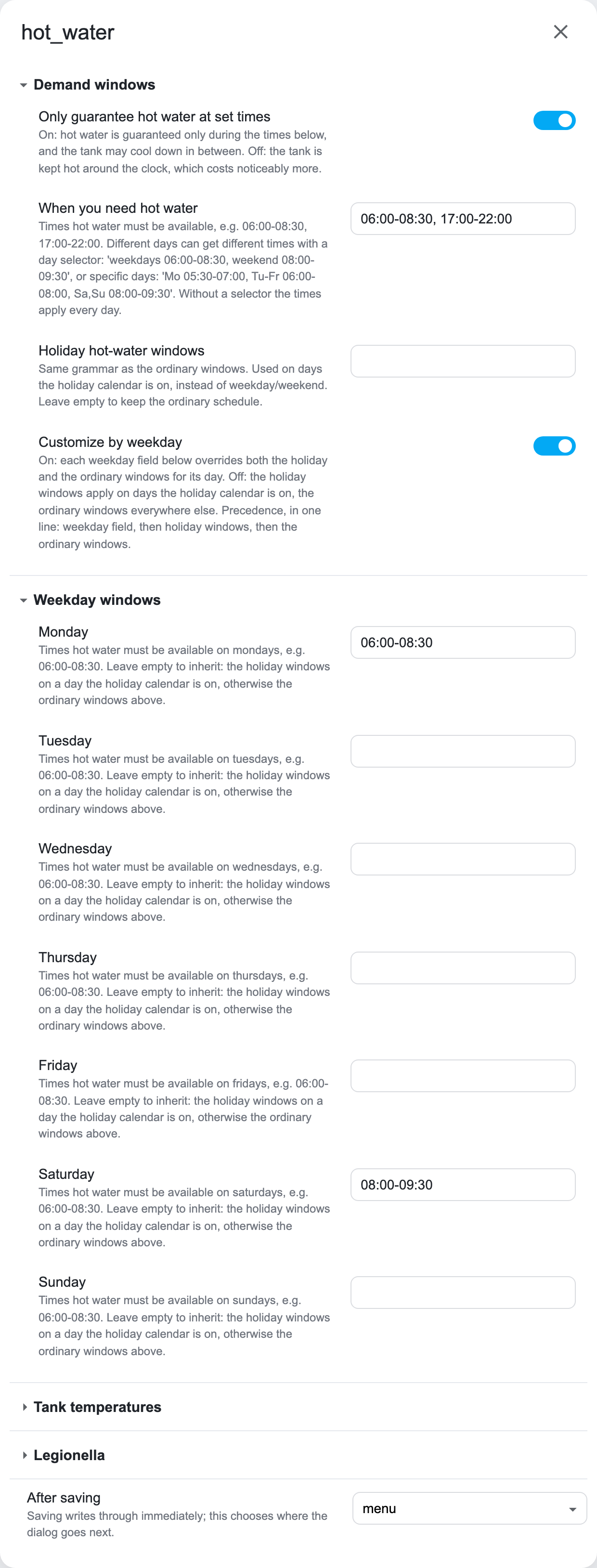
    Hot water is guaranteed inside demand time frames rather than kept permanently hot, which is where most of the saving comes from.

  4. Act

    Publish plan sensors, switch the heat pump, ECL110 displace / frequency advice

    The plan is re-solved once per optimization interval — 30 minutes by default — and holds until the next solve.

  5. Learn

    Afterwards: compare prediction against reality, nudge the learned parameters

    Every learner is snapshotted weekly (the last eight are kept), and a drift watchdog can roll them back to the last healthy snapshot.

    The full theory: how it works

The dashboard card

See what it intends to do, and change it

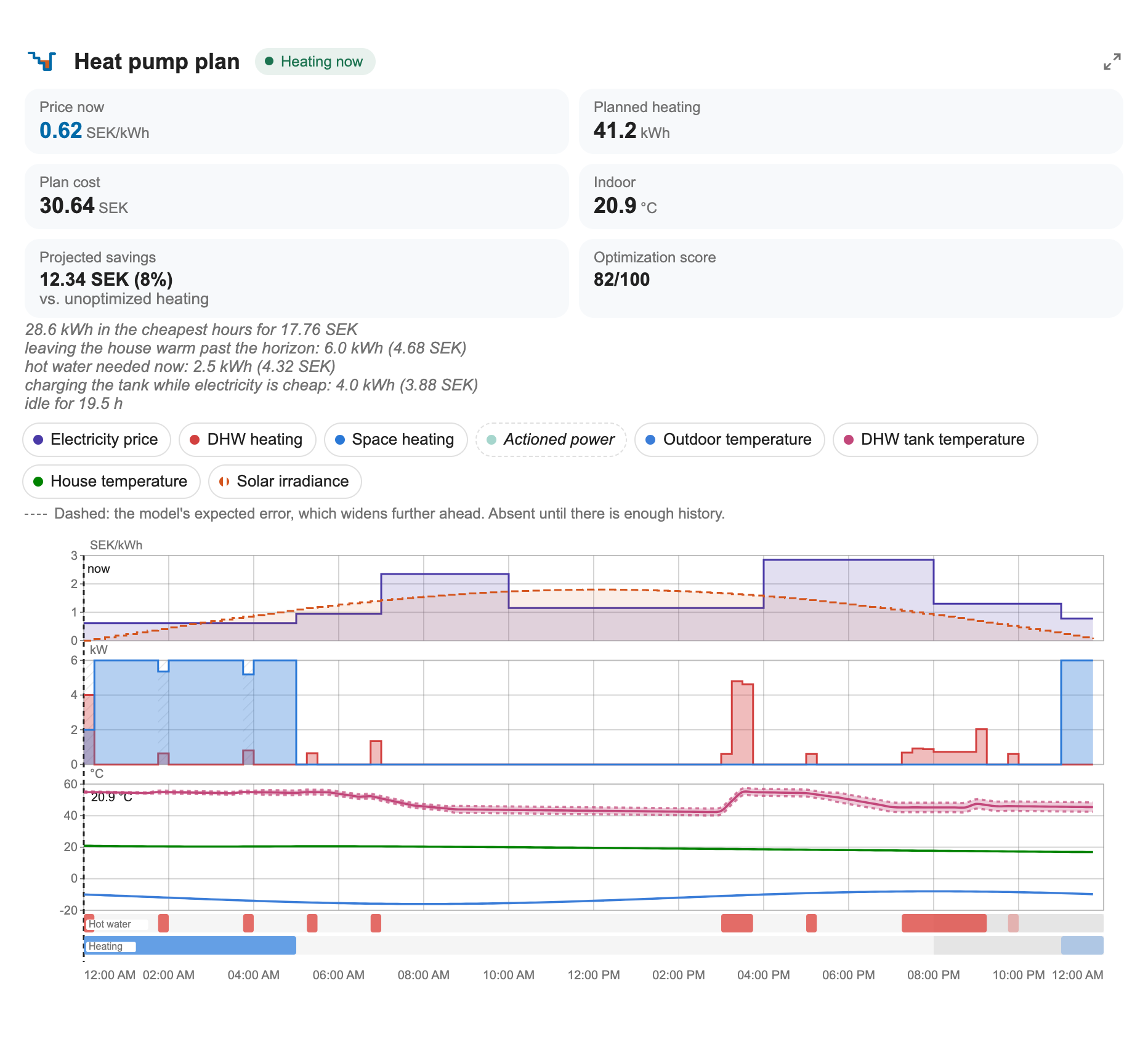
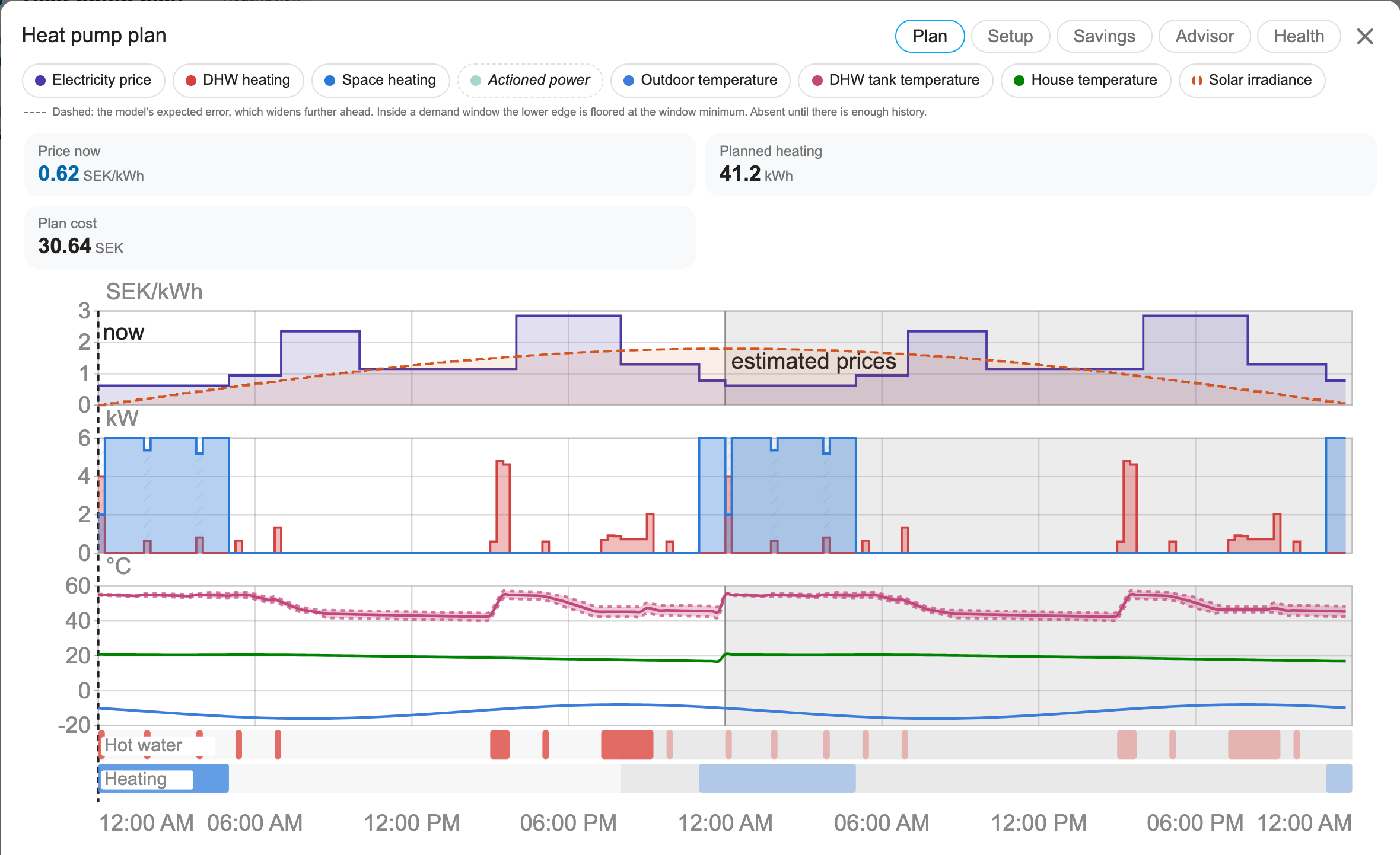
Each series has a legend chip that toggles it, hovering a slot shows why it was planned, and the stretch of the horizon whose prices are estimated rather than published is shaded. Click the card to enlarge it: the plan becomes two editable lanes you can drag, stretch, add to and remove from, with a running total and an Apply this plan button that pins your arrangement.

The integration serves and registers the card automatically. Add it with:

type: custom:heatpump-optimizer-card

Options and interactions: the dashboard card documentation

The dashboard card's plan chart: 24 hours of spot price, forecast temperature and solar, over the heating and hot-water slots the optimizer chose
The next 24 hours as the optimizer sees them — price, forecast, solar, and the slots it picked for heating and for hot water.
What it does

A plan, a model of your house, and the reasons behind both

Plans ahead instead of reacting.

A 24-hour model-predictive plan is re-solved on every interval against the full forecast trajectory, not against the weather right now. Space heating and hot water share one compressor, so they are planned against each other rather than one after the other.
Learns your house.

The heat-loss scale, tank cooling rates, the COP curve and its defrost derate, the solar aperture, internal gains, how the loss splits between floors, your hot-water draw statistics, your revealed comfort preference, and a cool-only heat-curve correction are all estimated from your own house. Every learner is snapshotted weekly (the last eight are kept), and a drift watchdog can roll them back to the last healthy snapshot.

Knows what your electricity actually costs.

Tibber spot prices, time-of-use grid transfer fees, the monthly capacity (effekt) tariff and its billing clock, PV self-consumption priced at what consuming actually costs you, and a learned diurnal price prior for the part of the horizon that has not been published yet. A live peak guard and a main-fuse headroom advisor act inside the metering window the plan never saw, and a contract comparison settles the month three ways so you can see what your tariff choice is worth.

Handles real plumbing.

A mixing valve is what lets a buffer tank store anything, so it is modelled explicitly. A wood furnace tank is a store of its own, drawn wood-first while it is usable, with an optional hot-water inlet coil. Your hydronic layout is picked from a catalog of drawn arrangements rather than described in prose, and circulation pumps — the hot-water loop and the space pump — are scheduled instead of left running.

Hot water that fits your household.

Hot water is guaranteed inside demand time frames rather than kept permanently hot, which is where most of the saving comes from. Draw statistics are learned per window, with a heavy-day (90th percentile) target so the second shower is not the one that runs cold.

Shows its work.

The plan is published as sentences grouped by reason, and graded 0–100 across envelope, machine and operation. Energy and cost accumulate into the Energy dashboard split by hot water versus space heating.

You stay in charge.

The card's editor pins exact run slots for up to 20 hours and the optimizer plans around them; a what-if simulator prices a comfort change before you commit to it; a climate entity and a switch give you the ordinary Home Assistant controls. Compressor frequency control is deliberately two-stage: it observes and advises until you explicitly turn writing on.

Stays out of trouble.

A staleness watchdog treats a sensor that stopped updating as missing and pauses learning rather than training on a flatline. Away and holiday mode sets back deeply and buys the recovery heat in the cheapest hours before you get home.

Fits your Home Assistant.

Entity names are translated (English, Swedish and German) and follow your Home Assistant language, without touching entity ids or history. Monetary units follow your instance currency.

Works with

Ordinary Home Assistant entities, and nothing you have to buy

Prices

A Tibber account with an API token (developer.tibber.com), or a price entity — a Home Assistant price sensor such as Nord Pool exposing raw_today / raw_tomorrow

Weather

A weather integration with hourly forecasts (Met.no or similar)

Your sensors

Everything else — indoor and outdoor thermometers, tank probes, a power meter — is optional. The optimizer runs without them and gets steadily better with each one you add.

Control pathHow is your heat pump controlled?

On/off switch

You provide

a switch that turns the heat pump on and off

The optimizer writes

may turn it off during expensive hours

ECL110 heat curve

You provide

a Danfoss ECL110-compatible weather-compensated controller, reachable over MQTT

The optimizer writes

a heat-pump on/off decision and an integer parallel shift (displace) onto the controller's own heat curve

Compressor frequency

You provide

the compressor frequency exposed as a number entity (typically from Modbus or ESPHome)

The optimizer writes

the recommended frequency via number.set_value — but only once you switch the mode to Control

None of these

With none of them

Each path is optional, the three are independent of each other, and with none of them configured “the plan is published on sensors for your own automations to act on”

Get started

From the Marketplace to a first plan

Home Assistant Marketplace (2026.11 and later)

  1. Add this repository to the Marketplace as a custom repository.
  2. Install Heat Pump Cost Optimizer.
  3. Restart Home Assistant.
  4. Go to Settings → Devices & services → Add integration → Heat Pump Cost Optimizer.

Before 2026.11 the same four steps run in HACS.

Open this repository in your own Home Assistant

Requirements

  • Home Assistant 2025.2.0 or newer
  • Python 3.13 or newer
  • numpy, scipy and threadpoolctl, installed automatically from the integration manifest
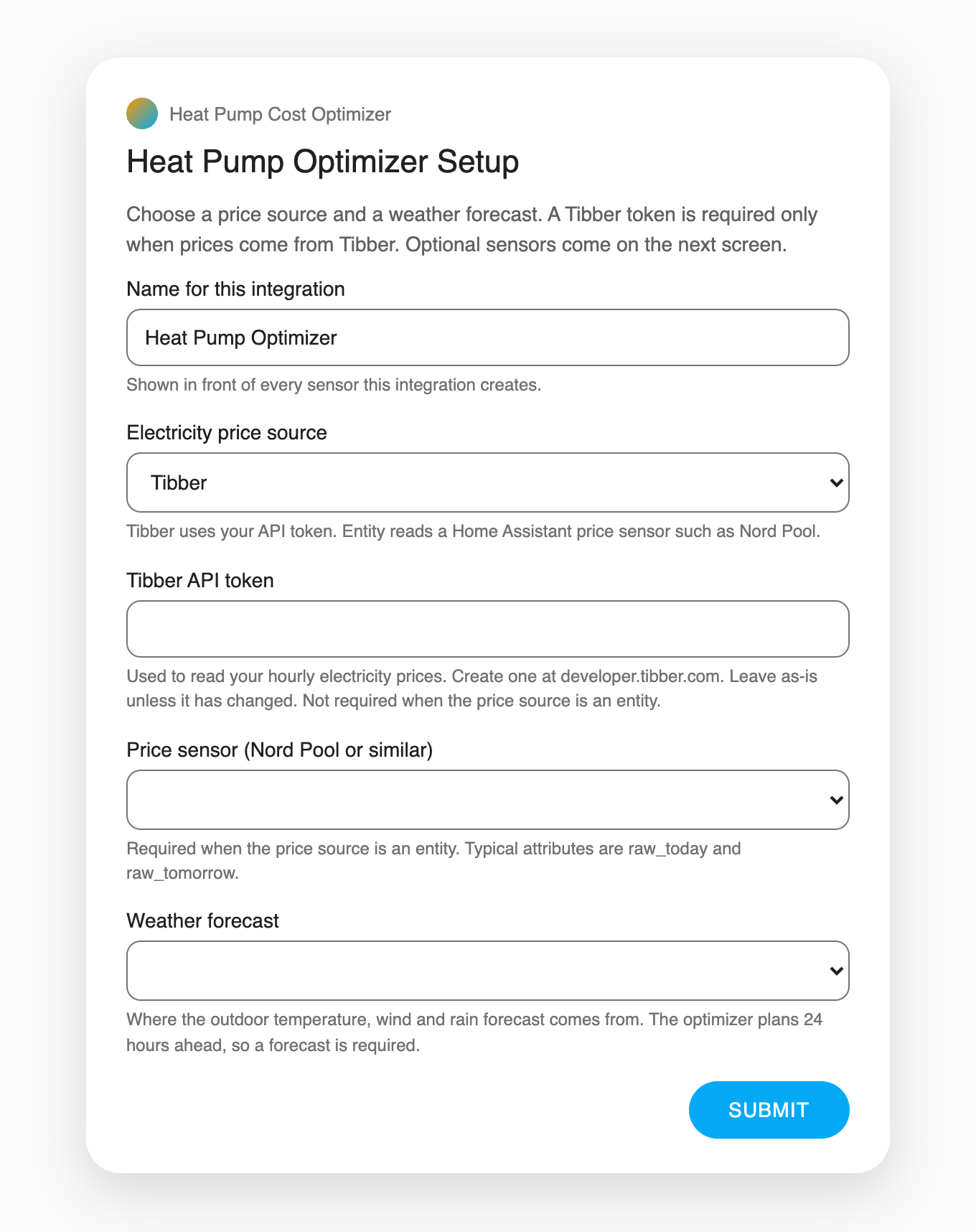
The first screen: a name, the electricity price source, a Tibber token field, a price-sensor picker and the required weather forecast picker
Screen 1 · Price source and weather
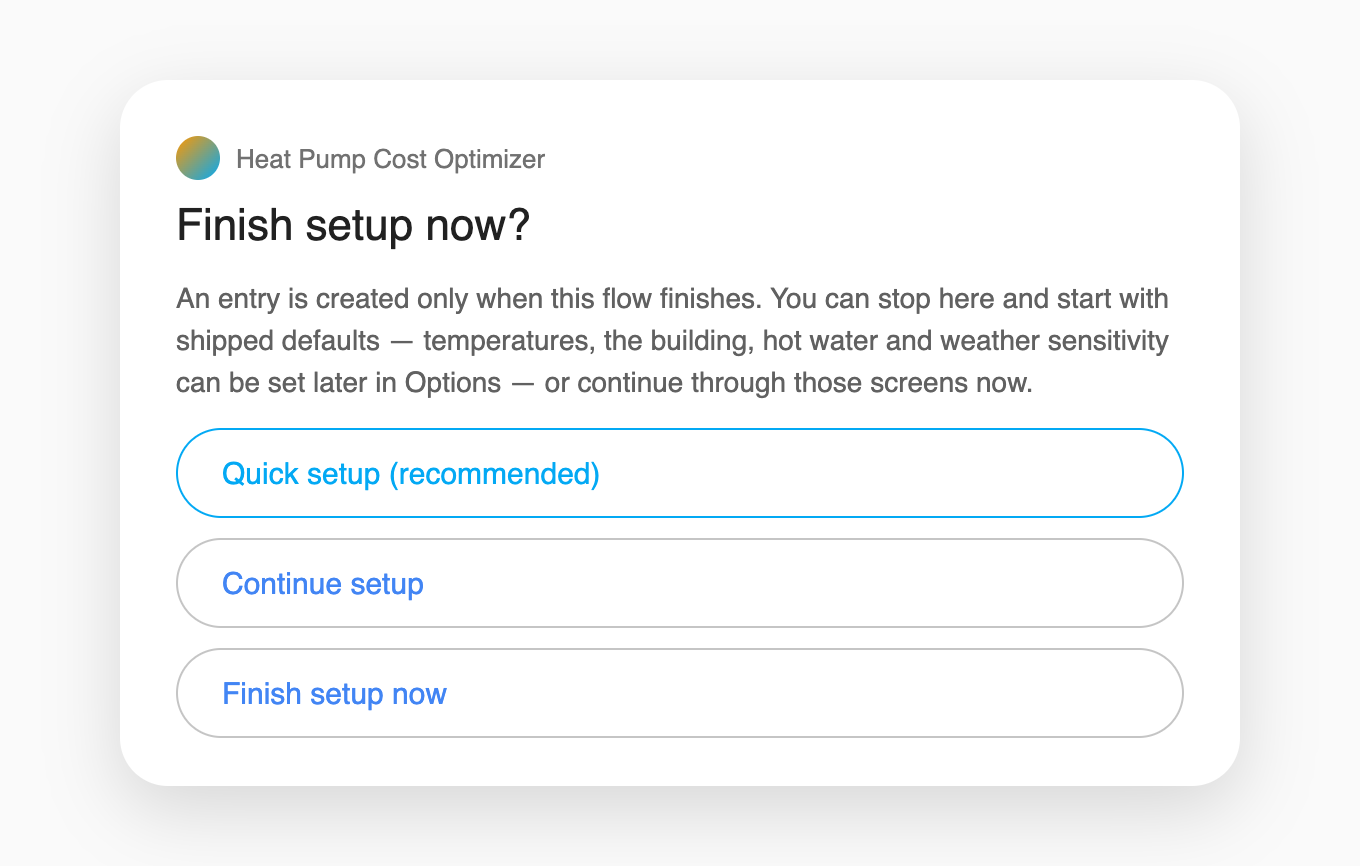
The finish-setup menu: Quick setup (recommended), Continue setup, Finish setup now
The choice: three ways to finish
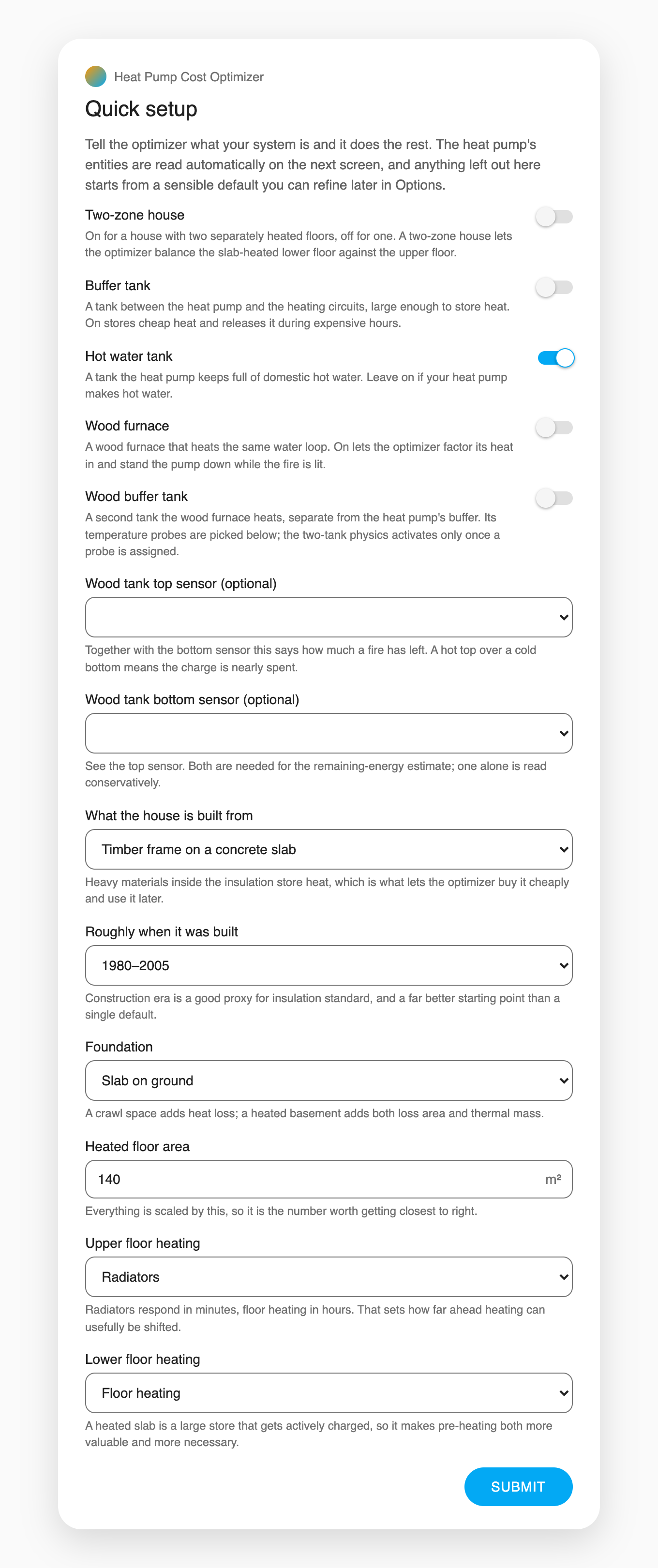
The Quick setup page: five toggles, two wood-tank sensor pickers, and the building questionnaire
Quick setup (recommended)
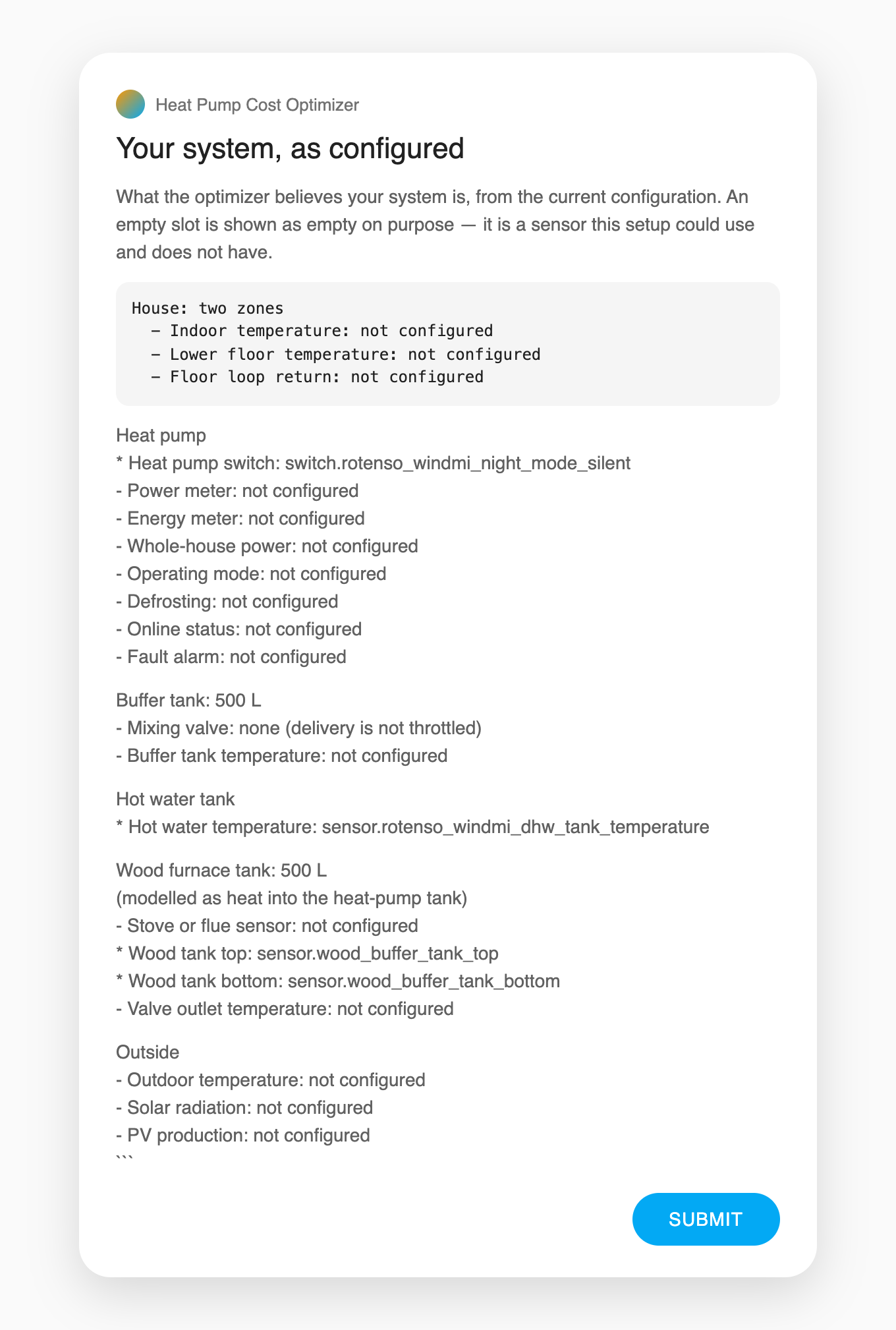
The overview: a read-only summary of the system as the flow configured it

Every screen, in order: setting up the integration

Your first week

  1. Immediately.

    The first plan is solved within one optimization interval (30 minutes by default). Add the dashboard card and you can see what it intends to do.

  2. Day one.

    If you want the commissioning step test, first switch on Allow a one-off measurement experiment under Advanced settings → Self-learning and diagnostics

  3. The first days.

    The heat-loss scale, tank cooling rates and the COP curve start correcting themselves as soon as there is data to correct them with.

  4. The first weeks.

    Hot-water draw quantiles and the heavy-day demand sensor need weeks of observation before they mean anything, and stay unavailable until they do.

Known limitations

What it will not do, before you install

Heating, not cooling.

There is no cooling mode and no cooling plan.

It plans on a cycle, not in real time.

This is a planner, not a real-time controller.

Prices come from Tibber or a price entity — nothing else.

There is no built-in way to feed prices from any other source.

The tariff model is Swedish/Nordic in shape.

Other markets' tariff structures are not modelled.

No discovery.

You add the integration yourself and pick every entity it reads.

Frequency control needs a number entity and your explicit say-so.

The default Observe mode “learns and recommends but never writes”

Savings figures are estimates.

Every cost, saving and percentage this integration reports is the output of a model, computed against forecast prices and forecast weather. Treat the numbers as a guide to relative decisions, not as an accounting record.

Written with AI, and what that costs

The characteristic failure mode is not bad code — it is confident wrong claims about code.

Nearly every one caught here was caught by re-measuring rather than by re-reading.

This is not a claim that the code is correct — it is a claim that assertions about it are recomputable, and that a wrong one is more likely to be caught than believed.

Every sentence of fact on this page is quoted from the documentation, and a test refuses one the documentation no longer makes.

Documentation

Everything in full

Each document is a page of this site, built from its source in the repository, and changes only when that file does. The README holds the entity and service reference.